Skip to content
Stell

WordPress performance / Guidance & services

Faster WordPress.
A clearer way forward.

A fast WordPress site depends on how it is built, hosted and maintained. Stell helps you understand what is slowing yours down—and make improvements that hold up in everyday use.

More than a speed score

Keep people moving.
Keep the website useful.

Slow pages make simple tasks harder: reading about a service, finding a product or contacting your team. Delayed feedback and shifting buttons can make a working website feel unreliable.

For your business, that can mean missed inquiries, interrupted purchases and more support questions. The goal is a dependable experience for the people using your site, with evidence to guide the work.

Choose with context

Three platforms.
No automatic winner.

WordPress, Shopify and Squarespace can all serve fast pages. The platform sets the available controls; the implementation determines how those controls, content and features work together.

WordPress · self-hosted

More control.
More decisions.

Hosting responsibility
You choose a host and agree who handles caching, updates and server care. Managed hosting can take on part of that work.
Themes & extensions
The theme, page builder and plugins shape both the page output and the work done behind it. External scripts add another layer.
Optimization options
Change code, assets, caching and database behavior within your hosting plan’s limits. Flexibility needs ongoing care.

Shopify · hosted commerce

A managed foundation.
A store you still shape.

Hosting responsibility
Shopify manages its hosting and CDN, with built-in caching and image delivery optimizations.
Themes & extensions
Theme sections, apps, media and marketing tags still influence what the browser downloads and runs.
Optimization options
Focus on theme code, content, apps and third-party scripts. Server configuration is managed by Shopify.

Squarespace · hosted builder

Fewer infrastructure choices.
Content still matters.

Hosting responsibility
Squarespace hosts the site and manages the platform infrastructure.
Themes & extensions
Templates, page sections, galleries, embedded tools and custom scripts affect the visitor experience.
Optimization options
Work within the builder’s controls: simplify pages, right-size media and review embeds and supported custom code.

Compare the same job. Test a product page against a product page with similar features—not against a simple brochure page. Keep device, connection, consent state and measurement method comparable before drawing conclusions.

Platform references: WordPress optimization · Shopify performance · Squarespace page size

Find the cause

Where is the
waiting happening?

A browser can struggle with a heavy page even when the server is quick. A small page can arrive slowly because WordPress is doing too much work before sending it. These need different fixes.

01 / The request path

Two ways to deliver the page.

Illustrative page-cache flow. Your host’s configuration determines the details.

Cache hit A reusable response is available

  1. 01Visitor requests a page
  2. 02Page cache serves a saved response
  3. 03Browser loads and displays the page

Fresh response Cache miss or an uncached request

  1. 01Visitor requests a page
  2. 02WordPress prepares the responsePHP · plugins · database work
  3. 03Browser loads and displays the page

A cache hit can skip repeated page generation. Images, scripts and rendering still need attention. Private or personalized responses need appropriate cache rules.

Behind the page / Server workload

Before content reaches the browser.

Caching & uncached requests
A page cache can reuse a prepared response. Logins, carts and personalized pages often need fresh work. Cache rules must protect private information and keep important content current.
Hosting, PHP & the database
PHP runs WordPress. Database queries, background tasks, remote API calls and available server capacity can affect response time. Check logs and timings before recommending a bigger plan.
Plugin behavior
Look at what runs, where and how often. One expensive query or frequent background task can matter more than several small plugins. Plugin count alone is a poor diagnosis.

On the device / Front-end loading

After the page begins to arrive.

Themes & page builders
Complex markup, large stylesheets and scripts can add download and rendering work. Review the actual output rather than assuming every builder is slow.
Images, video & fonts
Use appropriate dimensions and formats. Reserve media space to reduce movement, avoid unnecessary video downloads and limit font files. Don’t delay the main image just because other images can load later.
JavaScript & third-party services
Chat, analytics, ads, maps and embeds can compete for bandwidth and the browser’s attention. Load them where needed and test carefully before deferring or removing them.

Fix the measured bottleneck first. Smaller images can reduce transferred bytes. That alone does not establish lower PHP CPU use, fewer database queries or faster real-user visits.

Read the right signals

Measure the experience.
Understand the score.

Google PageSpeed Insights combines a controlled Lighthouse test with real-user data when available. Those two views answer different questions.

02 / An illustrative diagnostic

Look at three moments in a visit.

Conceptual examples, not a client report or measured performance results.

Content appears

Find the largest visible image or text block. LCP helps describe when it appears.

A control responds

Try a tap or key press. INP describes responsiveness across real visits.

The layout stays steady

Watch for unexpected movement. CLS describes layout shifts during use.

Lab data: investigate a page.

A simulated visit helps identify possible causes and compare changes under similar conditions. The Lighthouse performance score is a weighted summary; it can vary between runs and does not prove that forms, checkout or navigation work.

A standard loading test does not measure a full visit’s INP. Total Blocking Time is a useful lab clue, not a substitute for real-user responsiveness.

Field data: see real visits.

PageSpeed’s Chrome User Experience Report data covers a rolling 28-day period. Check whether it describes this URL or the whole origin. Search Console groups similar URLs to reveal broader patterns; your own real-user monitoring can add detail where available.

If there are not enough eligible samples, field data may be unavailable. That is a measurement gap—not a passing result. Use lab checks and real-device observations, and label their limits.

On a small screen, scroll the table sideways. With a keyboard, focus the table and use the left and right arrow keys.

Core Web Vitals: Google’s current thresholds
Metric & visitor questionGoodNeeds improvementPoor
LCP · Largest Contentful PaintWhen does the largest visible image or text block appear?≤ 2.5 s> 2.5–4 s> 4 s
INP · Interaction to Next PaintHow quickly do clicks, taps and key presses get visual feedback across a visit?≤ 200 ms> 200–500 ms> 500 ms
CLS · Cumulative Layout ShiftHow much does content unexpectedly move? A unitless score of the largest burst of layout shifts.≤ 0.1> 0.1–0.25> 0.25

Assess the 75th percentile of visits, separately for mobile and desktop: 75% of measured visits should be at or below each “good” threshold. A good Core Web Vitals assessment requires all three metrics to be good. These are thresholds, not promises for your site.

Official guidance: Web Vitals · About PageSpeed Insights · Search Console’s Core Web Vitals report

A practical starting point

Five checks
you can make.

Start with observation. You do not need to install another plugin to collect useful evidence.

If important pages are consistently slow, controls hesitate, or the results point in different directions, a performance review can help you decide what to do next.

Talk through what you found
  1. Choose representative pages.

    Include the homepage, a service or product page, an article and a key inquiry path. Note the exact URLs and whether you are logged in.

  2. Try a real phone.

    Use a connection your visitors might have. Read, scroll, open the menu and try key controls. Record where the experience feels delayed or unstable.

  3. Repeat comparable measurements.

    Run PageSpeed on mobile and desktop. Repeat a few times with the same URLs and conditions; retain the date, settings and range of results instead of the best score.

  4. Inspect what the page loads.

    Look for oversized images, early video downloads, extra fonts and third-party scripts. A developer can use the browser’s Network and Performance panels to confirm what costs time.

  5. Protect the important journeys.

    After any change, check navigation, form labels and validation, product choices and cart behavior in staging or a test environment. Don’t submit live forms or place orders for this check. Save before-and-after evidence.

Working with Stell

A focused review.
Changes with a reason.

You work directly with Chris Dekmar. We agree on the scope, investigate the site you have and explain which changes are worth making.

  1. 01 / Establish a baseline

    Understand the starting point.

    Record key pages, visitor tasks, test conditions and available field data. Review the hosting and WordPress setup within the agreed access.

  2. 02 / Find the bottleneck

    Follow the evidence.

    Separate slow responses from heavy browser work. Prioritize the issue affecting important pages and journeys.

  3. 03 / Make targeted changes

    Keep a way back.

    Use backups and staging where available. Make scoped, reversible changes to the relevant assets, code or configuration.

  4. 04 / Check the result

    Test beyond the score.

    Verify the important journeys in an agreed test environment. Compare before-and-after evidence, explain limitations and identify follow-up work.

Need ongoing attention after the initial work? Explore Stell’s website care and operations.

From real Stell work

Specific decisions.
Clear evidence.

Useful proof says what changed and what was actually checked. It does not turn every improvement into a claim about speed, sales or server savings.

CARTA / A focused mobile task

Give the trip planner its own space.

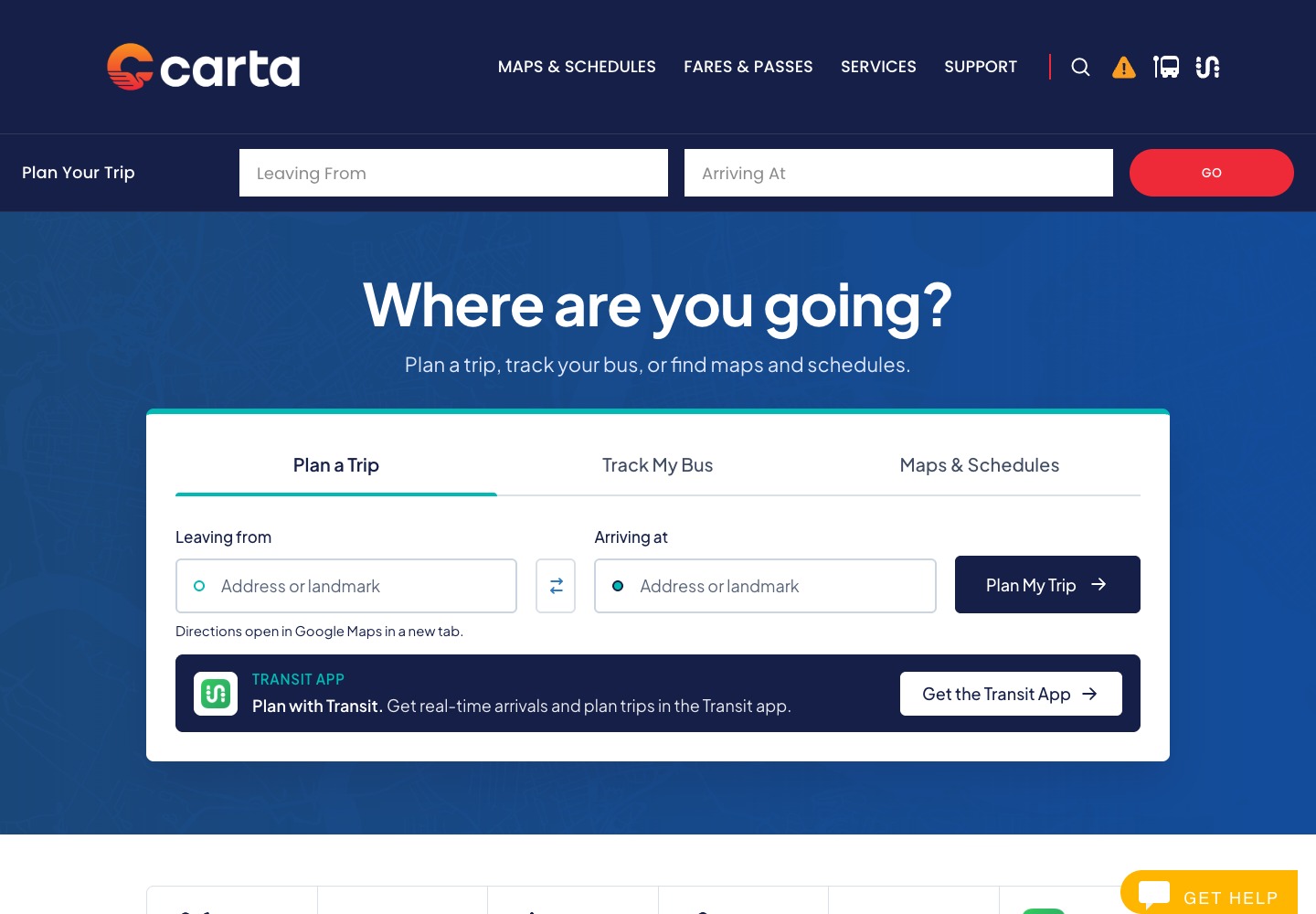
Stell’s CARTA work moved mobile trip planning to a dedicated destination, with a clear entry point from the website. That gives the tool room to work without crowding the homepage.

Evidence: the implemented page structure and documented design decision. No before-and-after load-time or completion-rate result is claimed.

Read the mobile planning example

Stell’s own site / Right-sized project images

Keep visual proof lightweight.

The source for Stell’s refreshed CARTA case study includes separate desktop and phone screenshots. Its desktop image file is approximately 106 KB; its phone image is approximately 58 KB.

Measured: source JPEG file sizes, checked October 16, 2026 (106,163 and 57,747 bytes). These are individual assets on Stell’s site—not total page weight, load time, Core Web Vitals or CPU measurements.

Explore the CARTA case study
CARTA desktop homepage from Stell’s case-study source, with a wide transit photograph and trip-planning controls
CARTA phone layout from Stell’s case-study source, with trip-planning controls stacked beneath the heading
03 / Responsive presentation

The same website. Room for a different screen.

Existing CARTA case-study images from Stell’s source library. These illustrate desktop and phone layouts, not the later dedicated-planner change or a before-and-after speed test.

A few useful answers

Before you
make a change.

Do I need a perfect PageSpeed score?

No. Use the score to investigate, alongside field data and important user journeys. A high score does not guarantee a useful website, and chasing the last few points can cost more than it helps.

Will a faster host solve the problem?

It may help if server response or capacity is the bottleneck. It will not automatically fix oversized media, unnecessary JavaScript or an awkward mobile layout. Measure first.

Why is my site slow after optimizing images?

Images are one part of the page. Slow PHP or database work, cache misses, fonts, theme output and third-party scripts can still delay loading or interaction.

Should I remove plugins or add a caching plugin?

Start with their behavior and your existing host’s caching. Removing a needed plugin can break a journey; adding overlapping caching can create problems. Test a specific change with a rollback plan.

Can you improve a WordPress site you didn’t build?

Often, yes. We first review the setup, access and constraints, then agree on practical work. Some problems need a focused fix; others may justify a larger refactor.

What does a performance review cost?

The scope depends on your site, its key journeys and the investigation needed. We’ll discuss the work and confirm the scope and fee before it begins.

Start with what you know

What’s slowing
your website down?

Share your website address, what feels slow and the tasks that matter most. Bring any reports you already have. We’ll talk through a practical next step.

Discuss a performance review